(updated from 1/21/23 post)
A year’s commitment to anything can sound daunting. I imagine that’s the feeling most people have when they consider committing to a 365-day Bible reading plan.
Besides that, most of those plans are designed to take you through the entire Bible. A worthy goal to pursue at least once in life. Yet, the challenge to get that done in a year can be tempting to ditch.
I completed one of those plans once on YouVersion…in about 3 years. See the point.
It took me that long because I choose to take my time. And I like to veer off track. If I want to campout in Jonah longer, I do. If I’m intrigued by a theme in Romans, I’ll take a break from the plan and complete other plans covering that theme…as many as I want as long as I want. Coloring outside the lines.
But the idea of reading a portion of the Bible every day does not mean you have to read the entire Bible in any set amount of time. All it means is placing a priority, developing a rhythm in your day that includes reading the Bible. Whenever you do it, how long you do it, where you do it, that’s entirely up to you. And, for those other rule breakers, what you read is also entirely up to you.
For quite a while, I’ve been using YouVersion reading plans. A nice thing that’s possible is customizing a year-long reading plan. Want to give it a try? Here are five steps.
- Determine to Make a Daily Commitment. Pretty obvious, but if you aren’t resolved to it, you won’t make it to December 31st. Sure, you might miss a day here or there. Understandable. Give yourself some grace and think about the fact that odds are you’ve got 5 minutes to give to this commitment and missing it a couple of times doesn’t make you a loser. If you are in, move on to step 2.
- Decide on a Theme. There’s a popular trend that’s replacing making New Year’s Resolutions. Instead of setting goals and aspirations, you choose a word that you’d like to guide you for the year. Not sure about that, check out this podcast episode to learn more. I started this in 2020. Each year I’ve utilized it differently, more broadly. This year, that word is what I’m using to customize my Bible reading. My word for 2024 is courage. Know your theme? Move on to step 3.
- Search Plans. On the YouVersion app (download it now if you haven’t already), you can search for reading plans simply by typing in a word. Most likely, dozens of reading plans are available. You’re ready for step 4.
- Save for Later. On each plan description, you have two choices: sample and save for later. Sample allows you to check out any day of the plan. I do that to get an impression if I think I’ll complete it. If I think so, then I save it for later. You don’t have to start the plan when you find it. I’m not worrying about saving enough plans that equal 365 days, by the way. I just saved the ones that looked interesting to me for now. At the moment, I’ve saved enough plans to get me into February (total up the days for each plan to see how many days you’ve already covered). Saved at least one plan? Final step is next.
- Follow the Thread. As you read each plan, some verse/story/character will stand out, grab your attention. Take note. Follow that lead to search for other plans to save for later. For instance, since I did my initial plan saving, the book of 1 Peter has gotten my attention. Adding reading plans can feel very fluid and interactive.
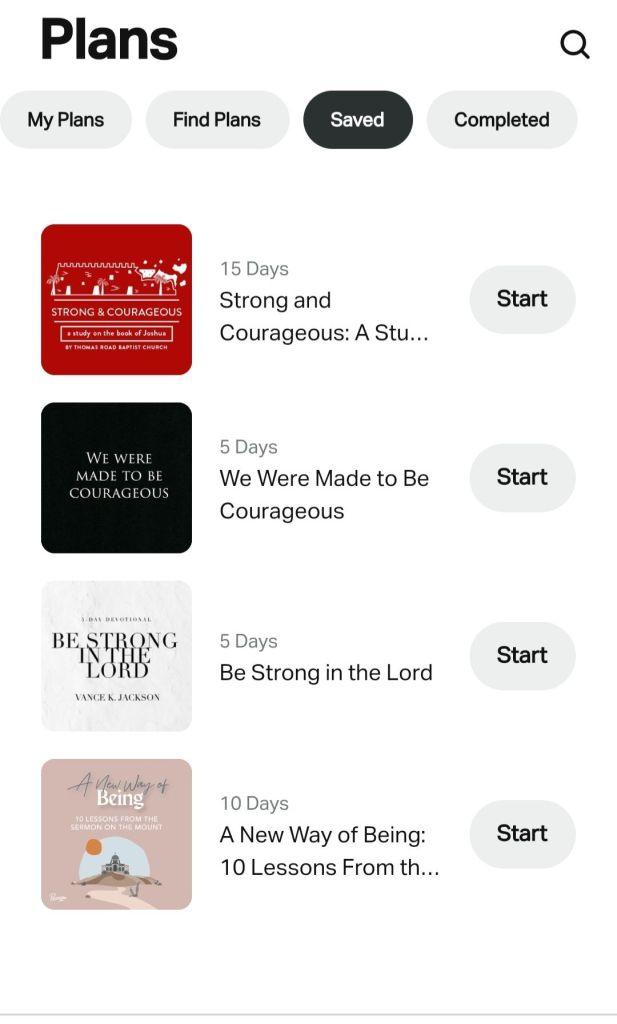
That’s it. This approach proved worthwhile and meaningful last year. If it ain’t broke…


 John Gregory